A Primal game
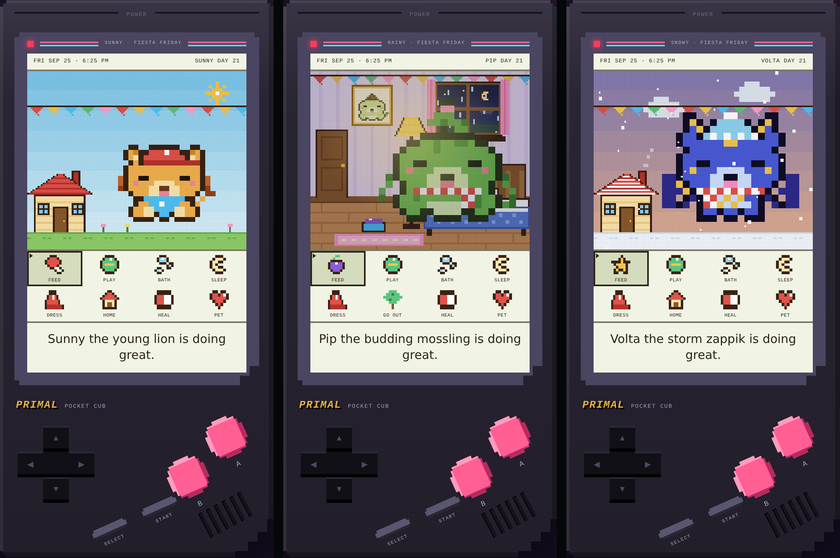
A pixel pet that grows up in real time. Feed it, bathe it, dress it up for the weather and watch it evolve over three months. Then bring it on your TikTok LIVE and raise it with your viewers.
No app store and no sign-up. Works on Android, iPhone, Windows and Mac. On a computer you can also download the game file.
The game
Time keeps passing even when the game is closed, so check in a few times a day. Your pet greets you, asks you questions and tells you when it needs something.
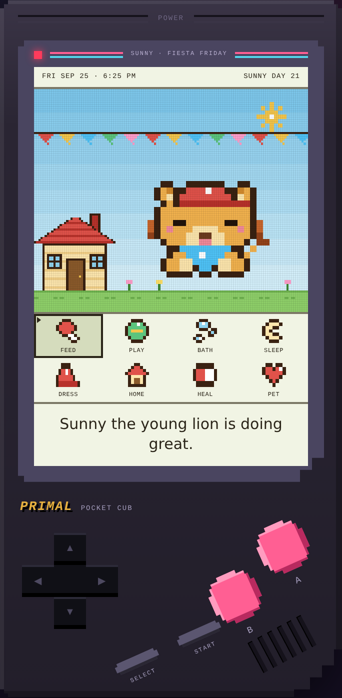
A lion cub, a Mossling or a Zappik. Each grows through five looks, with an evolution cutscene every time. Adopt up to three once you've learned the basics.
Play in the yard or head inside. Tap the lamp, the window, the bed and the food bowl.
Feed it, give it a shower and towel it dry, play the pounce game, and tuck it into bed at night.
Sun, rain, wind and snow. Your pet asks for a cap, a rain hat or a scarf to match the weather.
Butterflies, birds, presents, balloons, fireflies and shooting stars show up. Tap them before they're gone.
Stream mode gives you a clean, phone-shaped screen, a LIVE badge and big callouts for gifts and new followers.
Put it on your phone
No app store needed. Pocket Cub gets its own icon, opens full screen, works offline, and can ping you when your pet needs you.
Tap Play now. At the top of the game, tap INSTALL APP, then Install. No button? In Chrome, tap the ⋮ menu, then Install app or Add to Home screen.
Open this page in Safari and tap Play now. Tap the Share button (the square with an arrow), then Add to Home Screen, then Add. Open Pocket Cub from its new icon.
In the app, your pet will ask to ping you. Tap Yes! Or open Settings at the bottom of the game and tap REMINDERS. Android phones buzz too.
Reminders arrive while the app is open or was used recently. On iPhone they need iOS 16.4 or newer and the app must be on your Home Screen. iPhones don't support vibration for web apps. The app and Safari keep separate saves, so use the backup code in Settings to move a pet across.
Go LIVE with it
Pick the device you stream from. It takes about two minutes to set up.
Open the app from your home screen (see install steps). Tap GO LIVE: STREAM MODE. The game walks you through these same steps.
Open TikTok, tap + at the bottom, then slide over to LIVE.
At the very bottom of the LIVE screen, tap Mobile gaming. Want your face on screen too? Tap Camera in the menu above the Go LIVE button.
When your phone asks what to share, pick Entire screen and tap Start. On iPhone, tap Start Broadcast.
Your viewers now see your pet. Turn your volume up so they hear the game, and turn on Do Not Disturb so texts don't pop up.
Your pet lives in the browser you play in. Always open the game the same way, from the same link or home screen icon.
Click Play now in Chrome or Edge, or open the downloaded Pocket-Cub.html file. Click GO LIVE: STREAM MODE. Make the browser window tall and narrow so it fits TikTok's portrait screen.
Open TikTok LIVE Studio. Click Add source, then Window capture, and pick your browser window. Crop and resize it so the game fills the frame.
Click Add source, then Camera. Place yourself below or beside the game, in portrait layout.
Make sure your computer's desktop audio is on in LIVE Studio so viewers hear the game.
Click Go LIVE. Play with your mouse, or use the keyboard: arrow keys move, Z or Space is A, X is B, Enter pets your pet.
LIVE Studio also has a Link source, but you can't click inside it. Window capture keeps the game fully playable while you're live.
During your LIVE
In Stream mode the game fills your whole screen, so viewers see it big. Tap TOOLS in the bottom right corner to open these buttons. The tray closes itself after you tap one.
When someone sends a gift. Hearts rain down and your pet gets happier.
Feeds your pet for real. Try making it the reward for a Rose.
A burst of sparkles for big moments, goals and streaks.
For new followers and people joining. Your pet waves hello.
Puts a story, poll, riddle, fun fact or challenge on screen so your chat has something to talk about.
A 2-minute battle against a rival pet with gold points. Tap THANK YOU for gifts to power up. Your pet wins most battles.
Your pet kindly asks viewers to tap, follow and share the LIVE with friends and family.
Your pet posts chat ideas and friendly nudges on its own every minute or so.
Set a coin goal for the hour. Add coins as gifts arrive and the bar fills on screen. It resets every hour.
Not ready yet? Tap GO LIVE, then PRACTICE, for a pretend LIVE with made-up viewers to warm up with.
Gifts don't control the game by themselves. You tap the buttons when they come in. Keep gift requests friendly and optional, and check TikTok's LIVE guidelines for what's allowed.
FAQ
Yes. No ads, no sign-up and no purchases.
That's normal. Phones don't open downloaded game files. Install it as an app instead. It takes two taps, see Put it on your phone.
Yes, once it's installed and you turn on Reminders. Your pet pings you when it's hungry, messy, bored or sick. Android phones buzz too.
Open the game's settings panel, tap COPY CODE and save the code somewhere safe. On your new phone, paste it and tap RESTORE.
No. Updates keep your pets. For extra safety, keep a backup code.
Not on a phone. TikTok doesn't let games read gifts there. Use the four Stream mode buttons to react to gifts yourself.
Message us on Discord and we'll help you get set up.
Going LIVE for real?
Pocket Cub is made by Primal Network Agency, a TikTok LIVE agency. Message us on Discord and we'll help you grow.